Back to work

Refeyn / Scientific Software / Design System

Building Refeyn's design system

I established a scalable UI foundation for complex scientific software, helping product, R&D, and engineering teams move from inconsistent legacy interfaces toward clearer, more maintainable product experiences.

Role
Lead UX/UI designer
Focus
Tokens, components, documentation, adoption
Context
Scientific software and instrument workflows

When I joined Refeyn, there was no design system, just lightly customised default QT components that looked dated and inconsistent. We took the opportunity of working on the software of a brand new instrument for build our Design System

Challenges

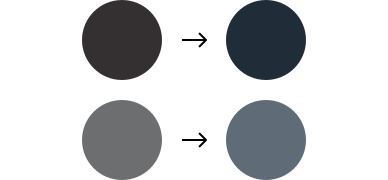
The software used a dark theme with an orange-tinted background that appeared more dark brown than modern.

The brand guidelines were minimal and print-focused, containing only a handful of shades of blue and orange - insufficient for building accessible digital products.

A full redesign of legacy applications wasn't feasible, it would have required significant time & resources. But adding features in the old UI would only increase inconsistencies.

The solution was to apply the new UI to all new software and adjust the old software's colours so both could coexist, enabling a gradual, unified transition.

Old colours moving to new colours

Project Goals

Modernise UI

Create a cohesive, professional design language that replaces dated default components.

Efficiency

Streamline workflows and speed up development execution

Scalability

Build a system that grows with new products across desktop and touchscreen, adapting and supporting new use cases

Accessibility

Ensure proper contrast, larger touch targets, and clear typography throughout.

Main Design Decisions

Colour Palette

Dark Theme with blue tints replacing orange-brown backgrounds for modern appearance and extending of Refeyn's brand. Extended colour palette for versatility and scalability

Roboto Typography

Roboto is a highly readable, modern neutral typeface ideal for user interfaces. Its open-source nature, broad device optimisation, and range of weights provide design flexibility and consistency

Icons

We added numerous new icons and redesigned all existing ones to create a cohesive style with rounded outlines and consistent stroke widths

Spacing System

We created predefined spacing rules, using values that are multiples of two to keep a clean, balanced look. This helps maintain a consistent rhythm throughout the design, making everything feel well-aligned and visually harmonious

Building Process

01

Establishing Foundations

After achieving an agreement with Marketing and Branding stakeholders, we extended the colour palette, created typographic scales, elevation and spacing rules, and icon standards

02

Creating Core Components

We built the initial core components needed in the software: buttons, checkboxes, radio buttons, toggles, text fields, pop-up dialogs, tabs, progress indicators, etc.

03

Technical Enablement

Transitioned from Qt to QML to enable greater flexibility

04

Gradual Rollout

Introduced new UI components and variations of the current ones and updated desktop legacy apps incrementally and organically, then extended to touchscreen applications on a later stage

03

Adoption

  • Built an internal component library app where each component already coded could be previewed in all states and variants, accelerating development and ensuring consistency.
  • Developed a comprehensive Figma file containing all components and documentation.
  • Created a Confluence space mirroring the Figma content to support a smoother transition for the software team.

Documentation

Documentation is a critical part of any design system, it bridges the gap between design and development, ensuring that components are implemented consistently and accurately.

Each time a new component was created or a variation introduced, detailed documentation was produced outlining its anatomy, properties, layout and spacing rules.

To streamline this process, a Figma plugin called Specs was used to automate documentation. All documentation was also mirrored in Confluence, allowing non-designers and other stakeholders to easily access and reference the same information without needing to use Figma.

Key Outcomes

+80

components

Continuously evolving design system with extensive component library

3x

Software Modules

Already designed with the new UI. And legacy software applications cohesively coexist with the new UI

2x

Platform Support

Scalable design supporting both desktop and touchscreen applications

Challenges Overcome

Brand Alignment

Extending the minimal palette required stakeholder buy-in and careful justification for digital needs

Legacy Coexistence

Managing old versus new UI during gradual rollout without jarring user experience

Documentation Adoption

Ensuring teams across the organisation embraced and utilised the new system guidelines

Platform Adaptation

Successfully scaling from desktop-focused design to touchscreen applications whilst maintaining consistency

Final thoughts

The Refeyn Design System transformed the software into a shared language that enables consistent, modern, and accessible experiences.

It allows a much faster implementation and supports scientists with tools that are both powerful and a pleasure to use

OTHER PROJECTS GLIMPSES